10-Hour Orientation Course – Part 1
This is Video 1 out 10 for the 10-hour Orientation Course covering ethics, confidentiality, boundaries, and electronic health records.
Please Read:
10-Hour Orientation Course: Ethics, Confidentiality, Boundaries, and Electronic Health Records
Overview
This is Video 1 of 11 in the required 10-hour Orientation Course covering ethics, confidentiality, and professional boundaries.
This course fulfills the prerequisite requirement for the RADT Trainee I Initial Application.
The course does not have to completed in a single session. You may resume coursework at your leisure. The system is designed to save your progress. However, to minimize disruptions in internet connectivity it is advised that you connect via a hardwire (ethernet cable) if at all possible.
Important: Completing the 10-Hour Orientation Course does not issue a RADT Number.
Your RADT Number is issued only after ALL steps in this application are completed, submitted, and approved by CCAPP Credentialing.
It is not valid for certified professionals and cannot be used for any other purpose.
No refunds are offered for this course.
CCAPP Members can access this course for free. If you are a member of CCAPP and cannot access this course for free please contact our Membership Department.
Course Structure:
The course is divided into 11 video lessons:
• Parts 1–8: One (1) quiz at the end of each part.
• Part 9: Two (2) quizzes — the first covers Part 9 content, the second reviews material from Parts 1–9.
• Part 10 (The Power of Documentation: Herdman Health EHR): Includes one (1) quiz and a Course Evaluation survey.
• Sexual Harassment Lesson: One (1) quiz at the end.
• Be sure to complete the Course Evaluation survey at the end of The Power of Documentation: Herdman Health EHR.
• The course will display as “In Progress” if any quiz is left unattempted or incomplete.
Check each Part for any missing quiz attempts before contacting support.
Quiz & Grading Policy
Each video lesson ends with a quiz. All quizzes must be completed to complete the course.
You have three (3) attempts per quiz.
The final passing score is based on your combined average across all passed quizzes.
To pass the course, you must achieve a minimum overall score of 75%.
If your final cumulative score is below 75%, you will not pass the course.
NOTE: You do not have to pass every quiz as long as your final score is 75% or better.
There is no retake option at this time.
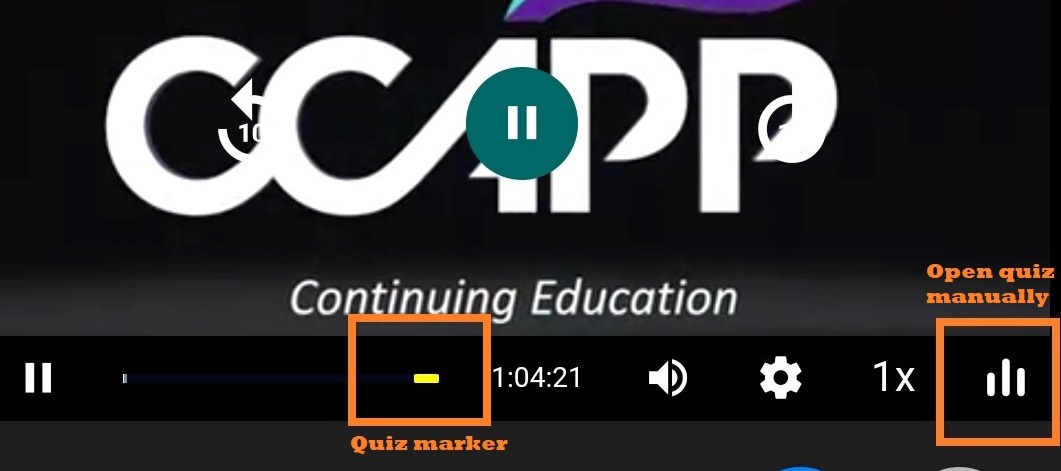
How to open the quiz manually:
• Click/tap on the Yellow Quiz Marker directly on the progress bar, or;
• Click/tap on the White Vertical Bars in the lower-right corner.
Technical Requirements
Our course videos are optimized for smooth playback. For the best experience:
•Use a hard-wired (Ethernet) connection instead of WiFi to reduce buffering or interruptions.
•Ensure your computer/device is in good working condition and meets the technical requirements.
Note: We are not responsible for individual device or connectivity issues.
Tips for Success
•Take thorough notes during each lesson to reinforce learning and prepare for quizzes.
•Watch the lessons attentively — active engagement improves both understanding and retention.
•Remember: the goal is not just to pass, but to begin building a foundation of knowledge and professional ethics that will guide your practice.
Upon completing all lessons and quizzes with a final score of 75% or higher, you will receive a course completion certificate
How to Find and Download Your Course Completion Certificate
- While logged in to your counselorcehub.com account.
- In the top-right corner, click on your profile icon (it will display your initials).
- From the drop-down menu, select Courses.
- On the Courses page, locate the course you completed.
- In course results, click the download icon to access and save your Certificate of Completion.
Questions, concerns or support request? Please contact help@counselorcehub.com